Save Time. Stay in Flow.
You know how it goes:
You want to access developer tools, inspect models, or debug something -
but first, you need to click through multiple menus just to activate Developer Mode.
Not anymore.
With ITISeasy Toggler, you can:
Instantly switch Developer Mode ON or OFF
Do it directly from the user dropdown menu
Stay on the same page - no reloads, no settings hunt
Learn more about developer productivity features 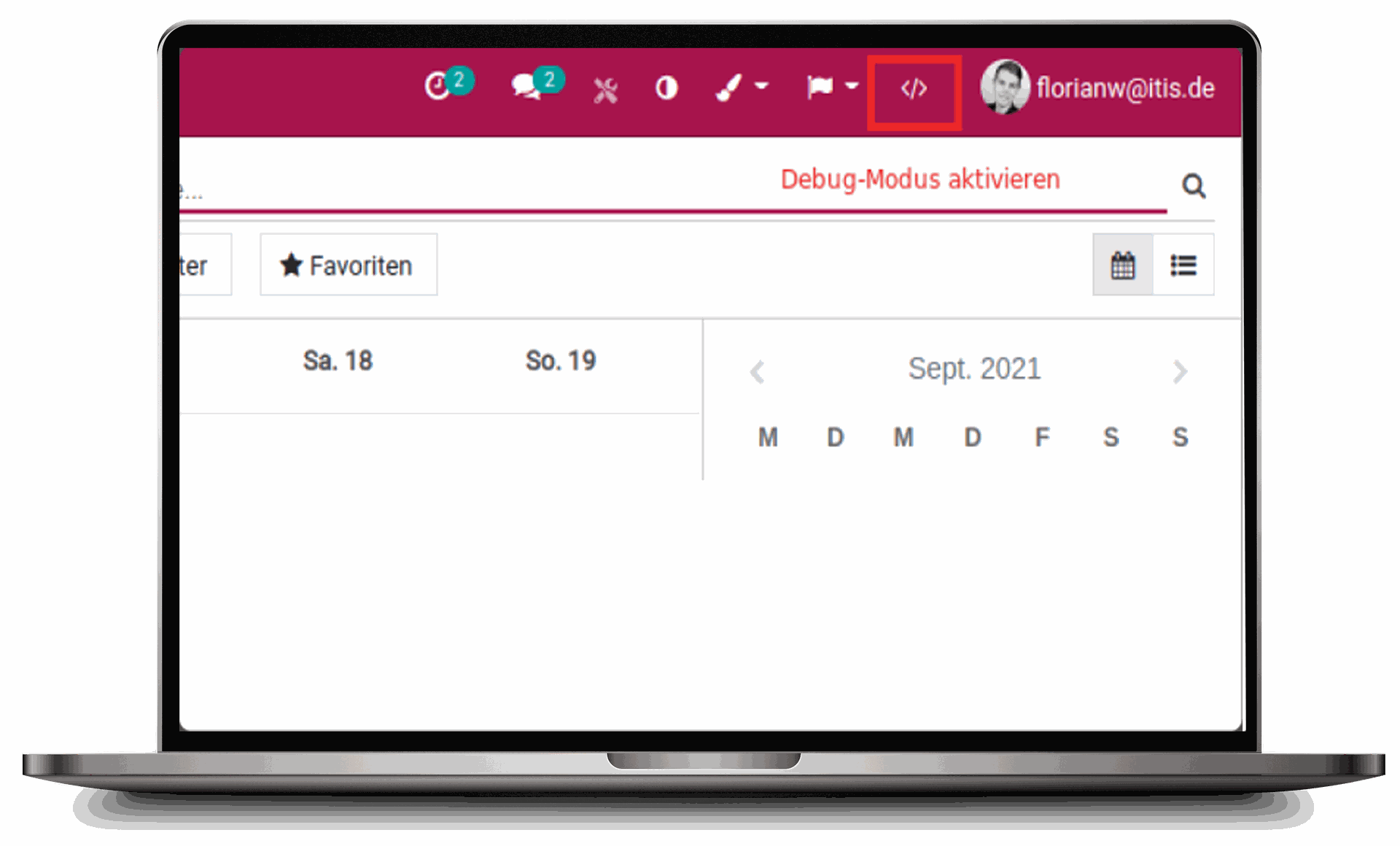
Save Time. Stay in Flow.
You know how it goes:
You want to access developer tools, inspect models, or debug something -
but first, you need to click through multiple menus just to activate Developer Mode.
Not anymore.
With ITISeasy Toggler, you can:
Instantly switch Developer Mode
ON or OFF
Do it directly from the
user dropdown menu
Stay on the same page -
no reloads, no settings hunt
Learn more about developer productivity features
How It Works
The Toggler Icon is conveniently placed next to your account avatar
Clicking it immediately activates or deactivates Developer Mode
No more scrolling through settings or losing context
Whether you're debugging workflows or customizing views -
you stay where you are.
How It Works
The Toggler Icon is conveniently placed next to your account avatar
Clicking it immediately activates or deactivates Developer Mode
No more scrolling through settings or losing context
Whether you're debugging workflows or customizing views -
you stay where you are.
Developer Mode in Seconds
Developer Mode in Seconds
Traditional Way
Go to Settings Scroll down Find Developer Mode Reload Return to where you were
Traditional Way
Go to Settings Scroll down Find Developer Mode Reload
Return to where you were
ITISeasy Way
Click the toggler
Developer Mode Activated - Done!
ITISeasy Way
Click the toggler
Developer Mode Activated - Done!
Pro Tip: Combine this feature with Quick Add Product or Scanner Operations to enhance your development and testing cycles.
Pro Tip: Combine this feature with
Quick Add Product or
Scanner Operations to enhance your development and testing cycles.

Built for Developers, Admins &
Power Users
Whether you're:
A developer inspecting models
A functional consultant tweaking views
An admin configuring access rights
the Developer Mode Toggler streamlines your process.
“It’s the little things that make a big difference - and this one saves you hours over time.”
Built for Developers, Admins & Power Users
Whether you're:
A developer inspecting models
A functional consultant tweaking views
An admin configuring access rights
the Developer Mode Toggler streamlines your process.
“It’s the little things that make a big difference - and this one saves you hours over time.”
Safe. Controlled. Smart.
Only users with the right permissions will see the toggler.
This ensures the Developer Mode is accessible to the right roles, without opening up sensitive tools to general users.
Safe. Controlled. Smart.
Only users with the right permissions will see the toggler.
This ensures the Developer Mode is accessible to the right roles, without opening up sensitive tools to general users.
Use Case
You're configuring a custom field in the Sales module.
Midway through, you realize you need Developer Mode to activate Studio View or view the technical name of a field.
Instead of:
Leaving your page
Navigating to settings
Losing your scroll position
Just click the toggler - and continue working without interruption.

Use Case
You're configuring a custom field in the Sales module.
Midway through, you realize you need Developer Mode to activate Studio View or view the technical name of a field.
Instead of:
Leaving your page
Navigating to settings
Losing your scroll position
Just click the toggler - and continue working without interruption.
Combine With Other ITISeasy Tools
Enhance your admin experience with:
ITISeasy Workflow Management ITISeasy Dashboard
ITISeasy Docs ITISeasy Credit Limit
Combine With Other ITISeasy Tools
Enhance your admin experience with:
ITISeasy Workflow Management
ITISeasy Dashboard
ITISeasy Docs ITISeasy Credit Limit
Want to See It In Action?
Enhance your admin experience with:
Book a live demo Contact us for technical questions Subscribe to updates on new features
Keep your momentum going - with ITISeasy Toggler Developer Mode, development has never been smoother.
Want to See It In Action?
Enhance your admin experience with:
Book a live demo
Contact us for technical questions
Subscribe to updates on new features
Keep your momentum going - with ITISeasy Toggler Developer Mode, development has never been smoother.